















Computer Use vs. Book Reading: Adjusting Your Power
TL;DR: Your Computer and Your Book Need Different Glasses
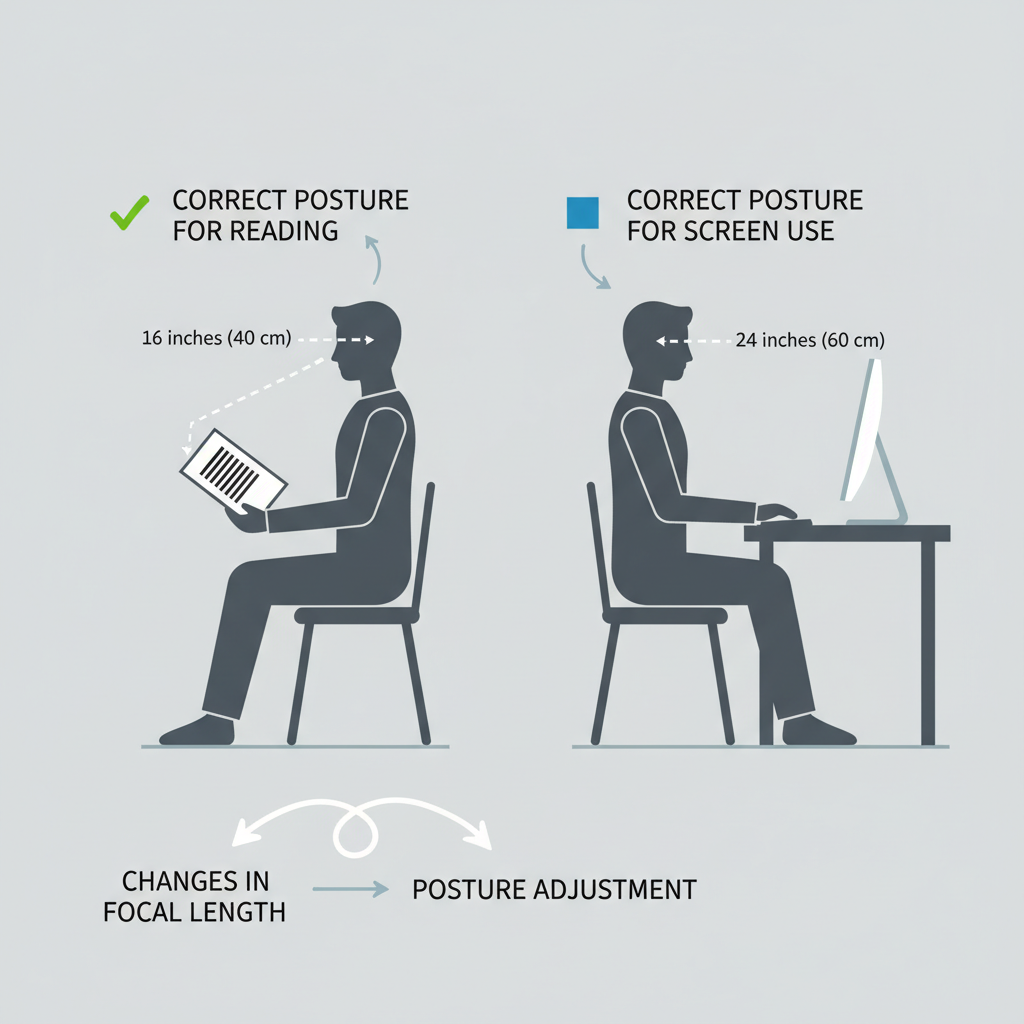
- Different Distances, Different Powers: A computer screen is typically 20-28 inches away, while a book is closer at around 16 inches. This difference in "working distance" requires a different lens power for optimal clarity and comfort.
- The Problem with "One-Size-Fits-All": Using reading glasses that are too strong (meant for books) for your computer can cause eye strain, headaches, and even neck pain from leaning forward to find the focal sweet spot.
- The Fix is Simple: As a general rule, you should reduce the power of your reading glasses by approximately 0.50 to 1.00 diopters (D) for comfortable computer use.
- Measure for Accuracy: The most reliable method is to measure the exact distance from your eyes to your screen and use that to determine the ideal power adjustment.
Have you ever finished a long day of computer work with a throbbing headache, tired eyes, or a stiff neck? Many of us blame the screen itself, but the real culprit might be your reading glasses. If you're using the same pair of glasses to read a report on your desk and a novel in your favorite chair, you might be setting yourself up for discomfort.
The truth is, the ideal power for viewing a computer screen is almost always different from the power you need for close-up reading. This article will explain the science behind this difference, guide you through selecting the correct power for each activity, and provide practical tips to create a more comfortable visual experience, whether you're working or relaxing.
The Core Issue: Why Working Distance Changes Everything
To understand why you need different glasses, we first need to talk about two concepts: presbyopia and working distance. For most people over 40, a condition called presbyopia sets in. As detailed by medical experts at the National Center for Biotechnology Information (NCBI), this is a normal part of aging where the natural lens inside your eye loses flexibility, making it harder to focus on close objects. This is why reading glasses become necessary.
"Working distance," however, is the specific distance between your eyes and the object you are focusing on. This is where the problem begins.
- Book Reading Distance: Typically 14 to 16 inches (about 35-40 cm).
- Computer Screen Distance: Typically 20 to 28 inches (about 50-70 cm).
That 6-to-14-inch gap is significant. Using a lens power calibrated for 16 inches to view a screen at 24 inches forces your eyes to work harder to bring the image into focus, leading directly to visual fatigue.
The "Trombone Effect" and Over-Correction
When your glasses are too strong for your screen, you may find yourself unconsciously leaning in, pushing your screen back, or sliding down in your chair to find the "sweet spot" where things are clear. The Mayo Clinic describes this as the "trombone effect"—constantly adjusting your distance to see. This not only strains your eyes but also your neck and back.
This is a classic sign of over-correction. You are using a lens that provides more magnification than the task requires. It’s a common misconception that stronger is always better when it comes to reading power. In reality, the right power for the right distance is the key to comfort.
A Practical Guide to Finding Your Ideal Computer Power
Finding the right power for your computer glasses doesn't have to be complicated. It involves a simple measurement and a bit of math. This approach is far more effective than guessing or buying multiple pairs of over-the-counter readers hoping one works.
Step 1: Measure Your Computer Working Distance
Sit comfortably at your desk in your usual working posture. Use a tape measure or a piece of string to measure the exact distance from the bridge of your nose to the surface of your computer screen. For most people, this will be between 20 and 28 inches. Write this number down.

Step 2: Calculate Your Estimated Power
Once you have your regular reading power (the one you use for books at ~16 inches), you can estimate your computer power. This is a heuristic used by opticians to find a comfortable starting point.
The Rule of Thumb: Subtract 0.50 D to 1.00 D from your reading power.
- If your screen is on the closer end (20-24 inches), subtract around 0.50 D.
- If your screen is farther away (24-28 inches or more), subtract 0.75 D to 1.00 D.
Here is a table to make it easier:
| Your Full Reading Power | Estimated Computer Power (20-28 inches) |
|---|---|
| +1.00 D | +0.50 D |
| +1.50 D | +0.75 D to +1.00 D |
| +2.00 D | +1.25 D to +1.50 D |
| +2.50 D | +1.75 D to +2.00 D |
| +3.00 D | +2.00 D to +2.25 D |
This strategy of using different pairs for different tasks is validated by consumer health advocates like AARP, which notes that a single pair of drugstore readers is often insufficient for varied daily needs.
Step 3: Test Your New Power
If you are ordering custom glasses, use the calculated power. If you are trying out ready-made lenses, it's wise to test your calculated power. Try to use the glasses for a real-world task for at least 20-30 minutes. Don't just glance through them. Read emails, work on a document, and see how your eyes feel. Your vision should be clear without you needing to lean in or pull back.
Beyond Power: Two Other Critical Adjustments
While getting the power right is the biggest step, two other factors can significantly impact your comfort and visual clarity.
1. Pupillary Distance (PD) for Near Tasks
Your Pupillary Distance (PD) is the distance between the centers of your pupils. When you look at something up close, your eyes converge, or turn slightly inward. This means your "near PD" is narrower than your "distance PD."
- The Problem: A single PD value used for all glasses is an average. For computer work, which is at an intermediate distance, an incorrect PD can induce prismatic effects, causing eye strain and pulling sensations. A small error can make a big difference, especially with stronger prescriptions. You can learn more about this in our guide on how to measure your PD at home for a perfect fit.
- The Solution: Ideally, the PD for computer glasses should be measured at your specific working distance. As a practical adjustment, your near PD is typically 2-4 mm less than your distance PD. Using this near PD for computer glasses is often more accurate than using a distance PD.
2. Lens and Frame Choices
Expert Warning: For anyone with astigmatism, over-the-counter (OTC) reading glasses are not a suitable solution for computer work. According to the American Academy of Ophthalmology, ready-made readers do not correct for astigmatism and have the same power in both lenses, which can lead to significant discomfort for those who need a custom prescription.
For extended computer sessions, many people find that dedicated single-vision computer glasses are far more comfortable than bifocals or general-purpose progressives. With a progressive lens, the intermediate (computer) zone is often a narrow band, forcing you to hold your head at an awkward angle. A single-vision lens dedicates the entire lens to your precise computer-viewing power, eliminating this issue and reducing neck strain.
Wrapping Up: Your Checklist for Visual Comfort
Switching between dedicated computer glasses and reading glasses isn't a luxury; it's an ergonomic necessity for anyone with presbyopia who spends significant time in front of a screen. By matching your lens power to your working distance, you directly address the root cause of digital eye strain.
Here are your key takeaways:
- Acknowledge the Difference: Stop using one pair of glasses for two very different tasks.
- Measure, Don't Guess: Take a moment to measure your screen-to-eye distance.
- Adjust the Power: Use your measurement to subtract from your reading power and find your ideal computer power.
- Consider the Details: Ensure your PD is appropriate for near-to-intermediate work and choose a single-vision lens for maximum comfort.
By following these steps, you can transform your workday, eliminating the distracting discomfort of eye strain and refocusing on what matters.
Frequently Asked Questions (FAQ)
Q: I have bifocals/progressives. Aren't they supposed to work for the computer? A: While they do have an intermediate zone, it's often too narrow for comfortable, long-term computer use. Many users find they have to tilt their head back, leading to neck strain. Dedicated single-vision computer glasses provide a much larger, more comfortable field of view.
Q: Is digital eye strain dangerous to my long-term vision? A: It's important to distinguish between "eye strain" and "low vision." According to Johns Hopkins Medicine, eye strain from screens is a temporary discomfort and does not cause permanent damage or lead to conditions like glaucoma or macular degeneration. However, if you experience significant vision changes, you should always consult an eye doctor to rule out underlying medical issues.
Q: Why do I get headaches when using store-bought readers at my computer? A: This is likely due to two factors. First, the power is probably too strong for the distance, as we've discussed. Second, if you have even a small amount of astigmatism, store-bought readers will not correct it, forcing your eyes to struggle and leading to headaches.
Disclaimer: This article is for informational purposes only and does not constitute professional medical advice. The information provided is intended to help you make informed decisions about your eyewear but should not be used as a substitute for a comprehensive eye examination and consultation with a qualified optometrist or ophthalmologist. Always consult with a professional for any health-related concerns, especially if you have pre-existing conditions.


