









Eyewear for Graphic Designers: Maintaining Color Accuracy
TL;DR: Protecting Your Eyes Without Sacrificing Your Art
For graphic designers and digital artists, color accuracy is non-negotiable. The fear that blue-light-filtering glasses will distort your perception of color is valid, but it doesn't have to be a choice between eye health and professional precision.
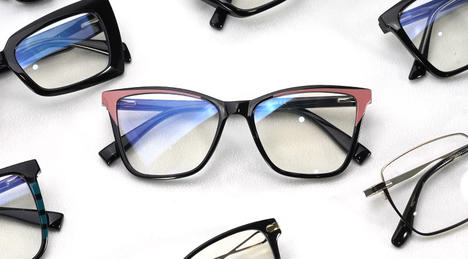
The solution is to choose the right technology. Avoid deeply tinted yellow or amber lenses for color-critical work. Instead, opt for high-quality, virtually clear lenses that use advanced filtering technology. Look for lenses with a high Color Rendering Index (CRI) of 95+ and light transmission over 90%. These specifications ensure minimal color shift and brightness reduction. Most importantly, you must calibrate your monitor while wearing your glasses to create a workflow that accounts for the subtle filtering, ensuring what you see is what your clients get.
The Designer's Dilemma: Digital Eye Strain vs. Color Fidelity
Working long hours on digital canvases is the norm for creative professionals. This sustained screen time is a direct cause of Digital Eye Strain (DES), a condition that goes beyond just feeling tired. According to ophthalmologists at the Cleveland Clinic, DES isn't primarily caused by blue light itself, but by a combination of factors including a reduced blink rate and the constant effort your eyes make to maintain focus on pixels.
Symptoms of DES are likely familiar to any working designer:
- Dry, burning, or itchy eyes
- Headaches and neck tension
- Blurred vision or difficulty focusing
- Increased sensitivity to light
To combat this, many turn to blue-light-filtering glasses. However, this introduces a new problem that is unique to color-critical professionals: the risk of color distortion.
Why Some Blue Light Glasses Distort Color
The visible light spectrum contains a range of colors, with blue and violet light having the shortest wavelengths and highest energy. Early or lower-quality blue light glasses work by using a yellow or amber tint in the lens material. This is a subtractive method—it simply blocks a large portion of the blue spectrum. While effective at reducing blue light exposure, this brute-force approach inevitably tints your entire field of view, making whites appear cream-colored and altering the perception of cool tones.
For a designer, this is unacceptable. It can lead to:
- Overcompensation: You might add too much blue to an image to counteract the yellow tint of the lenses, resulting in a final product that looks cold and sterile to a viewer on a standard screen.
- Inaccurate Branding: Misjudging a specific brand color (e.g., Tiffany Blue or Coca-Cola Red) can lead to rejected work and damaged professional credibility.
- Compromised Artistry: Your creative intent is lost in translation between what you see and what is actually being produced.
A rigorous 2020 double-blind study published in PubMed found no significant difference in eye strain symptoms between wearers of blue-blocking lenses and placebo lenses during a reading task. This reinforces the idea that the primary cause of strain is complex. Therefore, the goal for a designer isn't to block all blue light, but to reduce glare and improve visual comfort without compromising the integrity of your work.

Decoding the Tech: How to Choose Color-Accurate Lenses
The good news is that lens technology has evolved. Modern solutions exist that can protect your eyes without forcing you to work in a sepia-toned world. The key is to look past marketing claims and focus on technical specifications.
1. Prioritize a High Color Rendering Index (CRI)
Color Rendering Index (CRI) is a scale from 0 to 100 that measures how accurately a light source (or in this case, a lens) reveals the colors of an object compared to natural sunlight. For professional photography and print work, a CRI of 95 or higher is the industry standard.
Your eyewear should meet the same standard.
- Look for lenses rated CRI 95+: This ensures that the lens is distorting color so minimally that it's virtually imperceptible to the human eye.
- Avoid lenses without a CRI rating: If a manufacturer can't provide this specification, it's a red flag that the product is not designed for color-critical applications.
2. Demand High Light Transmission
Light transmission measures the percentage of light that passes through the lens to your eye. A lower-quality, tinted lens might have a transmission rate of 80-85%, which means it's not only tinting the color but also dimming your screen, forcing you to increase brightness and potentially causing more eye strain.
For design work, seek out lenses with a light transmission of 90% or higher. Lenses in the 95-99% range are effectively clear, providing protection via advanced coatings rather than absorptive tints. According to optical physics analysis published in PMC, high-quality filters can effectively reduce hazardous blue-violet light while maintaining high overall transmission of the "good" light required for accurate color vision.
3. Understand Coatings vs. Tints
The most significant innovation in color-accurate protective eyewear is the shift from tinted materials to advanced lens coatings.
- Tinted Lenses (Subtractive): The filtering agent is mixed into the lens material itself. This is less precise and almost always results in a noticeable color shift.
- Coated Lenses (Reflective): These lenses have a multi-layer coating applied to the surface that is engineered to reflect a specific, narrow band of high-energy violet and blue light (typically 400-455nm). Because it reflects rather than absorbs, and targets a very specific wavelength range, the impact on the rest of the visible spectrum is negligible. Many of these lenses have a faint blue or green reflective sheen when viewed from the outside but are perfectly clear to the wearer. Some of the best options feature this coating on the back surface to prevent reflections from entering the eye.
A Designer's Workflow: Integrating Eyewear for Perfect Color
Owning the right glasses is only half the battle. To achieve true color accuracy, you must integrate them into your professional workflow.

The Golden Rule: Calibrate Your Monitor With Your Glasses On
This is the single most important step creative professionals miss. Your monitor calibration device (like a Datacolor Spyder or Calibrite ColorChecker) measures the light and color emitted from the screen. If you wear glasses, the light is filtered after it leaves the screen but before it reaches your eyes.
By calibrating your monitor while wearing your glasses, the calibration software will account for the subtle spectral transmission of your specific lenses. This creates a profile that ensures the final image hitting your retina is color-accurate.
Step-by-Step Calibration Process:
- Warm-Up: Let your monitor warm up for at least 30 minutes for color stability.
- Position the Device: Put on your glasses and place the calibration device on the screen as usual.
- Run the Software: Follow the software prompts to run the calibration.
- Save the Profile: Save the new color profile. This profile is now optimized for your unique combination of monitor and eyewear.
- Be Consistent: Always wear the same pair of glasses when doing color-critical work under this profile.
The Two-Pair Strategy
For maximum performance, consider a two-pair approach:
- The "Color-Critical" Pair: These are your highest-quality, CRI 95+, high-transmission glasses. You use them exclusively for design, illustration, photo editing, and video grading.
- The "General Use" Pair: This pair can have a slightly more aggressive blue light filter. They are perfect for administrative tasks like answering emails, writing briefs, browsing the web, or working late at night when you want to protect your sleep cycle. While not perfectly color-accurate, they provide more comfort for tasks where precision isn't the top priority.
Beyond the Lens: Holistic Habits for Visual Health
Your glasses are a tool, but they work best as part of a broader strategy for eye health.
- The 20-20-20 Rule: As recommended by the American Academy of Ophthalmology, every 20 minutes, take a 20-second break to look at something 20 feet away. This relaxes the focusing muscles in your eyes.
- Optimize Your Lighting: Ensure your workspace is well-lit, but avoid glare. Position your screen so that windows or bright lights are to the side, not directly in front of or behind it.
- Ergonomics Matter: Position your monitor an arm's length away, with the top of the screen at or slightly below eye level. This helps not only your eyes but also your neck and back posture.
- Stay Hydrated: Your eyes need proper hydration to produce tears and avoid dryness. Keep a water bottle at your desk.
Frequently Asked Questions (FAQ)
Q1: Are yellow or amber "gaming glasses" suitable for graphic design? No. While they are effective at blocking blue light and enhancing contrast for gaming, they severely distort color perception. They are designed to make digital environments pop, not to represent colors accurately. They should be strictly avoided for any professional creative work.
Q2: Can I just use my monitor's "night mode" or an app like f.lux? Software solutions that warm up your screen's color temperature are helpful for reducing blue light exposure, especially in the evening. However, they fundamentally alter the colors on your screen, making them unsuitable for design work. Furthermore, professional glasses with high-CRI coatings provide consistent protection from glare and HEV light without needing to be toggled on or off, and they work across all your devices.
Q3: What's more important for a designer: 100% UV protection or a high CRI? Both are essential, but they serve different purposes. 100% UV protection is a non-negotiable health feature that protects your eyes from the sun's harmful rays, which can cause long-term damage like cataracts. High CRI is a non-negotiable professional feature that ensures your work is accurate. Any quality pair of prescription or custom-made non-prescription glasses should offer both.
Q4: Do I need an anti-reflective coating? Yes. An anti-reflective (AR) coating is critical for designers. It minimizes glare from your screen and ambient lighting, which reduces squinting and improves visual comfort. A good AR coating also improves light transmission, ensuring the maximum amount of accurate color information reaches your eyes.
Disclaimer: This article is for informational purposes only and does not constitute medical advice. Consult with a qualified optometrist or ophthalmologist to determine the best eyewear solution for your specific visual and professional needs.
References
- Cleveland Clinic - "Do Blue Light Blocking Glasses Actually Work?"
- PubMed - Rosenfield, M. et al. (2020). "Effect of blue-light filtering spectacle lenses on visual performance, sleep quality and ocular physiology."
- American Academy of Ophthalmology - "Computers, Digital Devices and Eye Strain."
- PMC - Rahmani, E. et al. (2020). "Blue Light Filters: A Review of the Evidence."


